
Morning Email
Powered by TodayTix provides automated sales reporting for every event on the platform. Reports are delivered by email and updated in the partner portal, so you always have a reliable picture of how your event is performing — without manual data pulls or spreadsheets.
The morning email is the daily digest. It arrives before local business hours each day, consolidating everything that happened yesterday into three distinct sections: what performances took place, what transactions were processed, and what your future showtimes pipeline looks like. Where the after-showtime email is about a single performance, the morning email is about the business as a whole.
Use the morning email to:
- Start the day informed — before your first meeting, you know exactly what happened yesterday across performances, sales, and future showtimes
- Run weekly sales meetings — the morning email gives you the talking points: which performances were strong, where day-of demand was weak, how future showtimes are trending
- Track the health of your event — the future showtimes section (sometimes called “the advance”) is the single best indicator of whether your event can sustain future operations, pay rent, and extend its run
- Spot trends across performances — when both a matinee and an evening performance appear side by side, patterns in audience composition and pricing become obvious
Prerequisites
You must be set up to receive sales figures for your event. To arrange this, speak to your PxT contact — they will configure the report recipients and ensure the right people are receiving the right events.
What you receive
One email per event, per day, arriving before local business hours. The email covers the previous day’s activity and is organized into three sections.
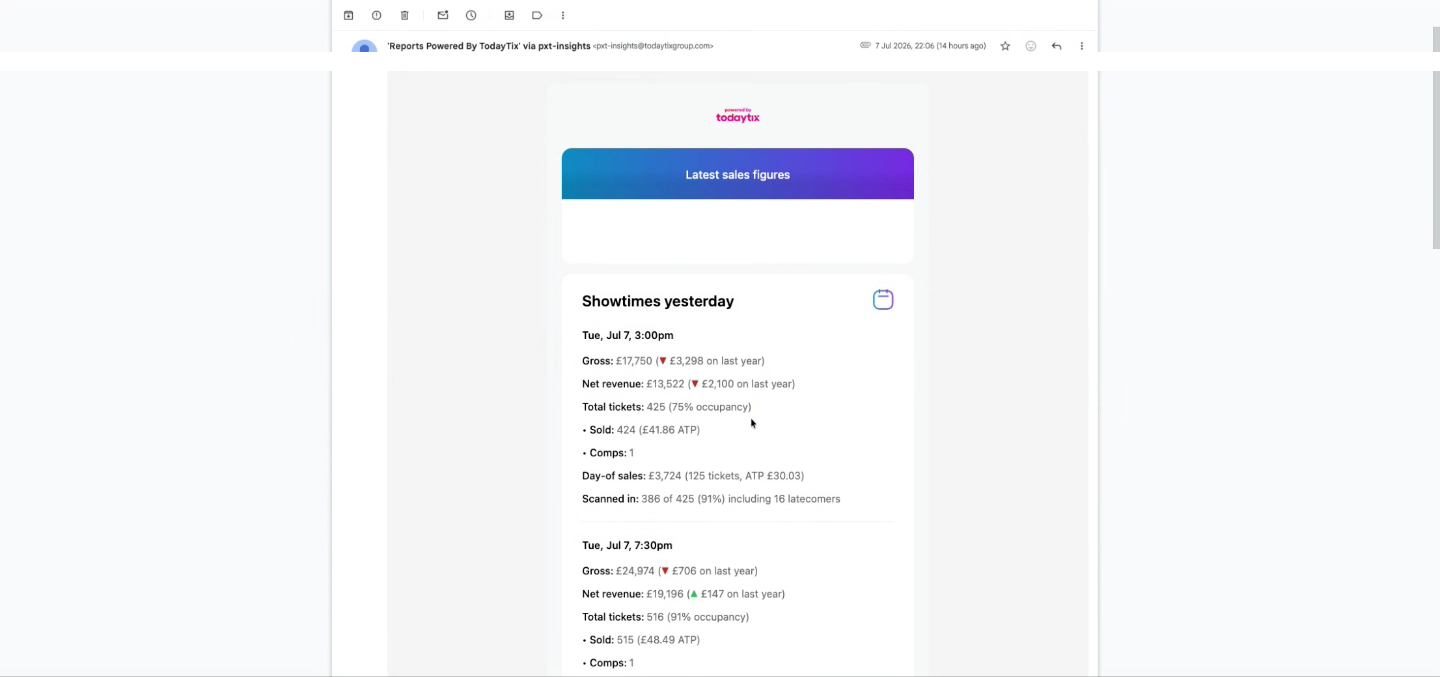
Section 1: Yesterday’s showtimes
This section contains the same metrics as the after-showtime email, but for every performance that took place yesterday. If your event had both a matinee and an evening performance, both appear here in one place — so you can compare them without digging through separate emails.
A blue summary row shows this week’s showtimes to date — aggregated totals across all performances so far this week. For events running longer than a year, year-on-year comparisons are included.
Section 2: Sales yesterday
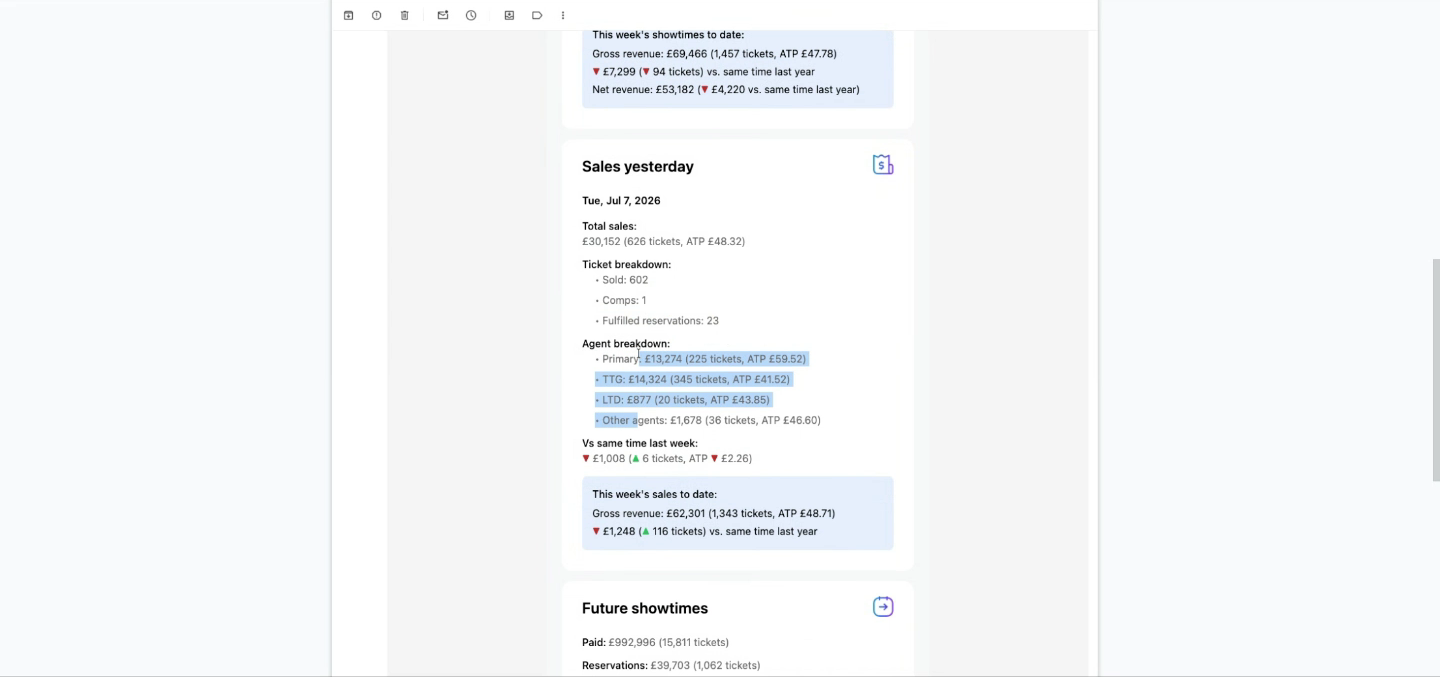
This section covers all transactions processed yesterday — regardless of which performance they are for. A ticket purchased yesterday for an event three weeks from now appears here. This is a different lens from Section 1: where Section 1 is about performances that happened yesterday, Section 2 is about sales activity yesterday.
A blue summary row shows this week’s sales to date — cumulative gross revenue, tickets, and ATP for the week, with a comparison to the equivalent period last year.
Section 3: Future showtimes
The future showtimes section (sometimes called “the advance”) shows the total value of tickets already booked for upcoming performances. This is the most important section for understanding the financial health of your event — it represents the money the event will use to pay rent, actors, and running costs.
Revenue in the morning email is always gross unless explicitly labeled as net. Reservation values are based on the face value of the reserved tickets, not an estimate.
All-time totals (short-run shows only)
For events running for less than one year, the morning email includes an additional section showing all-time totals: total tickets sold, total revenue, and ATP across the entire run. This section is omitted for long-running events where all-time figures are less actionable.
Attachments
The morning email includes several attachments:
- Showtime breakdowns — one PDF and one CSV per performance that took place yesterday (so an event with a matinee and evening gets four attachments: two per format)
- Transaction breakdowns — one PDF and one CSV covering all transactions processed yesterday, in the same multi-page format as the showtime breakdowns
- Sales by Showtime — a single PDF and CSV listing every performance (past and upcoming) with comprehensive metrics per row
See Email Attachments for a full walkthrough of what each attachment contains.
Next steps
- After-Showtime Email — the per-performance email sent 30 minutes after curtain
- Email Attachments — the PDF and CSV breakdowns attached to each email
- Sales Calendar — explore the same data interactively in the portal